Appearance
🚲 Feature 02: Virtual Garage & Component Wear Telemetry
NOTE
🧭 Navigation: 🧩 Features Index | 🚲 Wiki Home
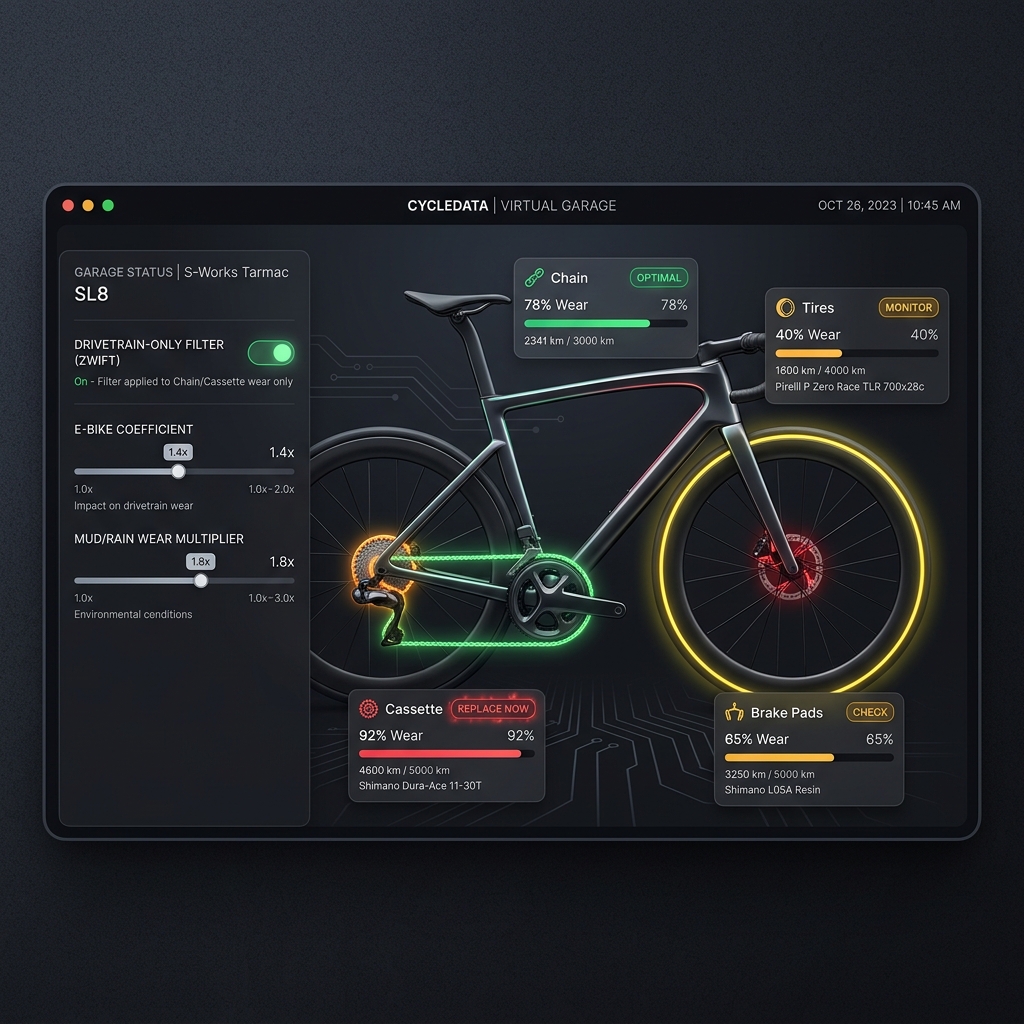
The Virtual Garage module functions as a specialized enterprise inventory and dynamic wear tracking platform for bicycle equipment. It enables riders to catalog component lifetimes (chains, cassettes, tires, brake pads) and monitor dynamic degradation over cumulative distance (kilometers) and operational hours.
🔍 How it Works (Product perspective)
- Digital Bike Inventory:
- Cyclists can configure multiple bicycles in their profile, specifying brand, model, type (Road, MTB, Gravel), and a starting frame mileage.
- Component Separation & Swapping:
- Components are modeled as independent assets. They are dynamically mounted and unmounted from bicycle frames rather than being hardcoded to a single bike. This mirrors real-world workshop operations.
- Dual-Wear Metrics:
- Component wear is measured across two metrics simultaneously:
- Distance (km): Lifespan based on odometer mileage.
- Time (Hours): Lifespan based on cumulative duration.
- High-density visual progress indicators in the UI change colors dynamically to communicate remaining health:
- 🟢 Health > 50%: Safe state, standard green styling.
- 🟡 Health 20% - 50%: Caution state, warning yellow styling.
- 🔴 Health < 20%: Replacement required, alert red styling.
- Component wear is measured across two metrics simultaneously:
- Environmental Wear Multipliers:
- The wear engine supports dynamic multiplier coefficients (e.g.,
x1.0for dry road conditions,x2.5for heavy mud/rain) that scale cumulative wear figures on currently mounted components after every ride.
- The wear engine supports dynamic multiplier coefficients (e.g.,
- Strava Webhook Synchronization:
- Integrates with the Strava API. Ride events matching a registered
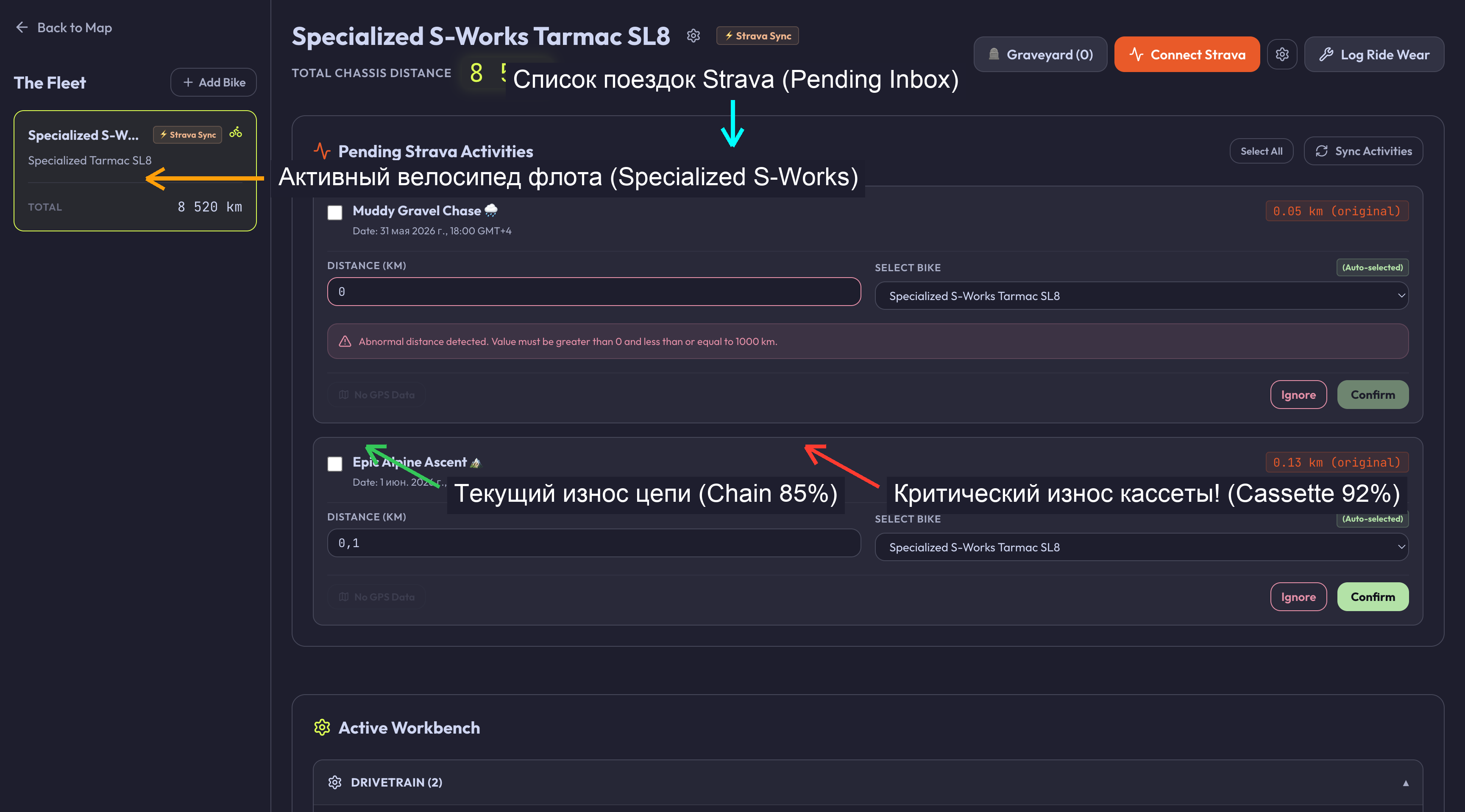
stravaGearIdautomatically trigger background webhook wear updates, adjusting lifespans on mounted parts without manual user input.
- Integrates with the Strava API. Ride events matching a registered
🏗️ Technical Architecture & Key Files
🖥️ Frontend State & UI Components
- UI Widgets:
apps/web/src/features/garage/(handles component cards, inventories, and mounting forms).apps/web/src/widgets/garage-panel/(dashboard grid layout container).
- Zustand State Store:
useGarageStoreinapps/web/src/features/garage/model/garageStore.ts.- Slice Fields:
bikes: Bike[](list of registered frames).components: Component[](all components owned by the user).activeBikeId: string | null(currently selected frame for detailing).isLoading: boolean(network loading state).isSyncing: boolean(Strava sync operation indicator).
- Slice Fields:
🔌 API Integration & Wear Engine
- Hono API Routers:
GET /api/garage/bikes&POST /api/garage/bikes&DELETE /api/garage/bikes/:idGET /api/garage/components&POST /api/garage/components&DELETE /api/garage/components/:idPOST /api/garage/components/mount(binds a component to a bike, unmounting it from prior frames).POST /api/garage/components/unmount(dismounts component from frame).POST /api/garage/components/service(resets service meters, logs maintenance log entry).POST /api/garage/wear/apply(manually distributes distance and multiplier wear transactional calculations).POST /api/garage/webhooks/strava-simulate(simulates callback webhooks).
- Wear Processor:
apps/api/src/services/wear-calculator.tshandles the backend calculations of dynamic wear under condition multipliers.
💾 Database Schema (Drizzle & PostgreSQL)
Persisted across five distinct tables in apps/api/src/db/schema.ts:
bikes:id: uuid(PK)userId: text(referencesusers.idcascade)name,brand,model,type,stravaGearId: texttotalKm: doublePrecisionisIgnored: boolean
components:id: uuid(PK),userId: text,bikeId: uuid(FK referencesbikes.idset null)name,brand,model,price: doublePrecision,category: text,status: text- Lifespan parameters:
maxLifespanKm,currentLifespanKm,maxLifespanHours,currentLifespanHours,serviceIntervalKm,currentServiceKm,serviceIntervalHours,currentServiceHours.
component_mounts:id: uuid,componentId: uuid(cascade),bikeId: uuid(cascade),mountedAt: timestamp,unmountedAt: timestamp.
maintenance_logs:id: uuid,componentId: uuid(cascade),bikeId: uuid(set null),actionType: text,notes: text,kmAtService: doublePrecision,performedAt: timestamp.
ride_wear_logs:id: uuid,bikeId: uuid(cascade),trackId: text,distance: doublePrecision,multiplier: doublePrecision,appliedAt: timestamp. Includes unique constraint on(bikeId, trackId)to prevent duplicate webhook/activity application.
🧪 Test Suite Coverage & Regressions
🔬 Vitest Unit Tests
apps/web/src/features/garage/model/__tests__/garageStore.test.tsapps/api/src/routes/__tests__/garage.router.test.ts- Validates transactional dual-wear calculations, Strava webhook simulation payloads, and component-to-bike validation checks.
🎭 Playwright E2E Tests
apps/web/tests/garage.spec.ts(Validates bike lifecycle: Add, equip component, inspect color indicators, unmount).apps/web/tests/garage-history.spec.ts(Asserts maintenance log history lists).apps/web/tests/garage-inventory-flow.spec.ts(Asserts inventory limits).apps/web/tests/garage-strava-webhook.spec.ts(Validates webhook simulated wear).apps/web/tests/visual-garage-audit.spec.ts(Asserts UI element collisions).
🐞 Known Issues & Resolved Bugs
- React Hook Form Numeric
NaNcrash (Resolved): RHF passing empty strings tovalueAsNumber: truefields resulted inNaNschemas, which crashed Postgres database operations.- The Fix: Configured a customized
preprocessNumberinsidepackages/shared/src/schemas/garage.tsthat safely coerces empty, null, or stringNaNinputs back to safe fallback integers (0orundefined) on submission.
- The Fix: Configured a customized
- Modals Key Accessibility (Resolved): Users could not dismiss modals easily.
- The Fix: Embedded a global keydown event listener capturing
Escapeevents inside both theAddBikeModal.tsxandEquipComponentModal.tsxpanels.
- The Fix: Embedded a global keydown event listener capturing
- Double Submission Vulnerability (Resolved): Rapid double clicks on the "Save" or "Equip" buttons spawned duplicate records.
- The Fix: Configured active submitting trackers to lock input fields, disable buttons, and change the CTA text to
"Equipping..."or"Saving...".
- The Fix: Configured active submitting trackers to lock input fields, disable buttons, and change the CTA text to
👣 Step-by-Step Manual Verification
- Click the Garage (Гараж) icon in the top toolbar to slide open the Telemetry dashboard.
- Click Add Bike (Добавить велосипед).
- Fill in the name, set the starting mileage, and hit Save. Confirm the bike appears in your digital rack.
- In the form, clear the mileage completely and click submit. Verify the form coerces it to
0cleanly without crashing or throwing a Zod schema validation error. - Open your newly created bike panel and select Equip Component (Установить деталь).
- Create a component (e.g. Chain) and click save. Confirm it mounts immediately and displays a healthy green indicator.
- Hit
Escapekey inside the modal overlay and verify the modal closes instantly.